

Table of Contents
On May 19, 2026, Google did something it had not done in more than 25 years: it redesigned the search bar. Not cosmetically, but architecturally. The new interface, powered by Gemini 3.5 Flash, accepts image uploads, video queries, and live camera input as native first-class inputs. No Lab sign-up. No experimental tab. The default.
If you’ve been tracking AI Mode since its quiet Labs debut in March 2025, the announcement is the logical conclusion of a trajectory that was already clear. AI Mode now exceeds one billion monthly users, queries have more than doubled every quarter, and Google’s own data shows a 65% surge in visual searches since AI Mode went multimodal. The direction was never in doubt. What I/O 2026 changed is the timeline: multimodal search is now the default interface, not a forward-looking experiment… or it is clearly hinted as the default.
But here is the thing about moments like this. The architecture that makes it possible did not arrive in May 2026. It was assembled, piece by piece, over roughly a decade, from a rudimentary image classification API in 2015 to a natively unified embedding model that can semantically index a video’s spoken audio, visual frames, and surrounding text as a single mathematical object. Understanding that stack is what separates SEOs who will adapt quickly from those who will spend the next year retrofitting keyword logic onto a fundamentally different retrieval system.
In this article, I will try to explain how it actually works — the history, the theory, the mechanics, and the implications — drawing on Google’s primary documentation, DeepMind’s published research, and Andrea Volpini‘s analysis at WordLift, which remains the most operationally useful practitioner-facing framework for visual fan-out.
The history you need to know (and the parts usually left out)

Cloud Vision: Vision as recognition (2015–2016)
The story starts in February 2016, when Google opened the Cloud Vision API to all developers. The capability was real and genuinely useful: send an image to a REST endpoint, get back labels, face detections, landmark identifications, OCR results, and explicit content flags. Powered by convolutional neural networks trained on massive image datasets, Cloud Vision could tell you that an image contained a bicycle, a sunset, and a person, and with confidence scores for each.
But what it could not do was understand the relationships between those elements or map visual meaning into the same space as the text queries users were actually typing into Google Search. The label “Eiffel Tower” was a discrete token, not a semantic coordinate. The gap between that label and the query “romantic city break in Europe” was architecturally unbridgeable. Cloud Vision confirmed what a human could name. It could not understand what a human would want.
One early indicator that Google understood this limitation: even in that era, the landmark detection feature grounded its identifications against more than 70,000 monuments linked to Knowledge Graph entities. The system was not just labeling, but it was also pointing toward entities in a structured knowledge base. The seed of what would become entity-based visual retrieval was already there.
Cloud Video Intelligence: the metadata layer (2017)
In 2017, Google extended the same paradigm to moving images with the Cloud Video Intelligence API. The system could analyze video at the segment, shot, and frame levels, generating structured annotations for object tracking, shot-change detection, logo identification, speech transcription, and on-screen text extraction with timestamps.
Its limitation was architectural: all of that richness — the spoken words, the visual objects, the temporal structure — was converted into text-based metadata stored in traditional inverted indexes. Users queried the extracted metadata, not the rich audio-visual signal itself. Subtle context — vocal tone, physical motion, temporal relationships between events — was frequently lost in transcription. The system created an excellent, structured inventory of video content. What it could not do was understand that inventory semantically, or match a natural-language question against it at the level of meaning rather than keyword overlap.
These two APIs define the pre-embedding era: vision as recognition, video as metadata extraction. Fast, scalable, genuinely useful, and fundamentally limited by the absence of a shared semantic space where visual and linguistic meaning could coexist.
MUM, Multisearch, and the missing links (2021–2024)
The period between the legacy APIs and the current embedding architecture contains developments that are often skipped in tech retrospectives but are important for understanding the trajectory.
In 2021, Google announced MUM (Multitask Unified Model), which it described at the time as 1,000 times more powerful than BERT, trained across 75 languages, and explicitly multimodal. Google said MUM could understand text and images simultaneously, with video and audio described as future capabilities. MUM was not a product in the Cloud Vision sense; it was a signal that Google’s research direction had fundamentally shifted toward unified cross-modal understanding.
Also in 2021, Google Research published the ALIGN paper (A Large-scale ImaGe and Noisy-text Embedding), trained on 1.8 billion image-text pairs scraped from the web, aka noisy data used at an enormous scale. ALIGN learned a joint embedding space using contrastive learning: two encoders (one for images, one for text) trained to output similar vectors for matching pairs and dissimilar vectors for non-matching ones. This is the direct architectural ancestor of Gemini Embedding 2. Unlike Cloud Vision’s discrete labels, ALIGN produced continuous semantic coordinates; a photograph and a paragraph could now occupy the same mathematical space, and their similarity could be measured geometrically.
In 2022, Multisearch allowed combining image and text in a single query. In 2024, Google announced “searching with video” for queries about objects in motion. The arc is linear: from recognizing what is in a visual to understanding what a user wants from it.
Google Lens as the behavioral forcing function
One development that belongs in this history but rarely gets the attention it deserves is Google Lens. Launched in 2017 and deeply integrated into Android and later iOS, Lens brought visual search to hundreds of millions of users who had no idea they were doing “visual search” because they were just pointing their phone at things. By I/O 2025, Lens was processing more than 20 billion visual searches per month.
That scale generated something invaluable: a behavioral corpus of what people actually look for when they point a camera at something. Not the queries they typed but the things they showed. This signal fed directly back into Google’s intent modeling and helped calibrate the query fan-out system that AI Mode now runs. Lens is not just a product; it is the training data generator for multimodal search intent.
The theoretical core: what a vector embedding actually does
Before going further into the mechanics, the theory deserves a precise explanation, and not a hand-wavy one.
A vector embedding is a mathematical representation of a piece of content — a word, a sentence, an image, a video clip, an audio waveform — as a point in a high-dimensional space. Imagine a map, but instead of two axes (latitude and longitude), you have thousands. The fundamental property that makes this useful for search is: semantic similarity corresponds to geometric proximity. Things that mean the same thing — or are relevantly related — end up near each other in the space, regardless of what form they originally came in.
The early embedding revolution was text-only. Google’s word2vec (2013) demonstrated this with the famous arithmetic: “king” minus “man” plus “woman” ≈ “queen.” The relationship between royalty and gender was encoded geometrically. BERT and its successors extended this from individual words to full sentence and paragraph meanings.
The multimodal extension of this principle is the key architectural shift of the past four years: instead of just text, you encode images, video frames, audio waveforms, and text paragraphs into the same high-dimensional space. A photograph of a beach and the query “relaxing coastal vacation” end up geometrically close. A video clip of ocean waves and the spoken phrase “ocean sounds for sleep” end up near each other. Cross-modal retrieval — finding a video with a text query, or finding a text explanation with an image query — becomes a simple nearest-neighbor problem in a shared space.
The retrieval mechanism that operates on this space is cosine similarity: a mathematical measure of the angle between two vectors, regardless of their magnitude. In practice, for a search query, the system generates a query vector, then finds the indexed content vectors that are closest to it by angle. Items above a similarity threshold are returned as results. At the scale of Google’s indexes — billions of images, hundreds of millions of videos — this requires Approximate Nearest Neighbor (ANN) search algorithms that trade a small amount of recall precision for massive speed gains. Google’s vector search infrastructure, as the company has stated publicly, shares its backend with Google Image Search, YouTube, and Google Play.
Gemini Embedding 2: the engine under the hood

Released by Google DeepMind in public preview on March 11, 2026, Gemini Embedding 2 is the model that makes the I/O 2026 search redesign technically possible. Its defining characteristic — the thing that separates it from the previous generation of Vertex AI multimodal embeddings — is native multimodality.
Earlier multimodal embedding systems ran separate encoders for each data type and then attempted to align their vector spaces after the fact. Text had its own model, images had theirs; the alignment between them was an additional step that inevitably lost information. Gemini Embedding 2 eliminates that post-hoc alignment. All five supported modalities — text, images, video, audio, and PDF documents — are processed through a single shared Transformer architecture built on the Gemini foundation model, and they all output into one unified 3,072-dimensional vector space.
From Google DeepMind’s official documentation: “Maps text, images, videos, audio, and documents into a single, unified embedding space to capture the semantic relationships across data… Understands different modalities and interleaved inputs, eliminating the need for separate embedding models and reducing pipeline complexity.”
And from the Google AI Blog announcement: “Expanding on our previous text-only foundation, Gemini Embedding 2 maps text, images, videos, audio, and documents into a single, unified embedding space, and captures semantic intent across over 100 languages.”
The Interleaved Input Mechanism, and why SEOs should care
The architectural detail that has the most direct implications for content optimization is Gemini Embedding 2’s ability to process interleaved inputs: a request can combine an image and a text caption into a single unified vector, not two separate embeddings averaged together.
What this means in practice: when Google indexes a product image on your page, it is not computing two separate signals — one for the visual content of the image, one for the surrounding text — and then combining them downstream. It can encode the image together with its ALT text, caption, and immediately surrounding paragraph as a single joint mathematical object. Their relationship is encoded geometrically, not handled by post-hoc logic.
The implication for optimization: a caption that explains the function or intent of an image — not just its visual content — becomes a geometric component of the image’s position in the retrieval space. “Safari vehicle at dawn in the Masai Mara — the golden hour makes this the ideal departure time for big cat tracking” positions an image very differently from “Safari vehicle at dawn in the Masai Mara.” The second sentence adds intent, context, and a semantic relationship to a specific user goal. That is not a copywriting flourish. That is an embedding signal.
Matryoshka Representation Learning: flexible precision
Gemini Embedding 2 also supports Matryoshka Representation Learning (MRL), which is a training technique, named after Russian nesting dolls, that forces the model to pack the most semantically critical information into the earliest dimensions of the vector. The full default output is 3,072 dimensions; the model can be truncated to 1,536 or 768 dimensions with minimal accuracy loss, because those earlier dimensions already carry the bulk of the semantic meaning.
For SEOs and content teams, this is primarily relevant when thinking about how Google might balance retrieval precision against index scale. For direct practitioners building RAG pipelines or visual search systems on top of the Vertex API, it is an infrastructure design decision — smaller dimensions mean faster retrieval and lower storage cost; larger dimensions mean higher semantic precision. The Vertex AI documentation on Gemini Embedding 2 provides the technical specifics for those implementation decisions.
Audio in the unified space
One of the most underappreciated aspects of Gemini Embedding 2 is its native audio encoding. Unlike the previous generation of multimodal embeddings, which relied on ASR transcription (speech-to-text) as an intermediary — converting spoken audio to text, then embedding that text — Gemini Embedding 2 can embed raw audio directly into the same unified semantic space as text and images.
This matters because transcription introduces errors. Every ASR error is a semantic displacement — a mispronounced word, a misheard phrase, a dropped sentence — that shifts the audio’s embedding position away from its intended meaning. For video content specifically, the quality of YouTube’s automatic captions is a direct factor in how accurately a video is indexed for semantic retrieval.
There is also a more fundamental point here. In 2018, DeepMind researchers demonstrated (in the “Objects that Sound” research) that networks can learn the natural correspondence between visual and audio signals that coexist in video, without explicit labels. A barking dog and a dog’s image end up near each other in the shared space through self-supervised learning. Gemini Embedding 2’s native audio encoding is the productized, scaled evolution of that research lineage.
Separately, Google Research published in 2025 a Speech-to-Retrieval approach that encodes spoken queries directly into the retrieval space without passing through ASR transcription at all, specifically to avoid the precision loss that transcription errors introduce. Whether this is in the current Ask YouTube production stack is not publicly confirmed, but it represents the direction the audio-side architecture is heading.
Note on speculation: the Speech-to-Retrieval architecture is documented as Google Research work. Whether it is currently deployed inside Ask YouTube or AI Mode’s audio handling is not confirmed in public documentation. I included it here as directional evidence, not as a confirmed product fact.
Visual Query Fan-Out: how AI Mode actually processes an image

Text Fan-Out first: the substrate
To understand visual fan-out, we need to understand text query fan-out first, because the visual version is built directly on top of it, and because text fan-out is where Google has been most explicit about its mechanics.
When a query enters AI Mode, Gemini does not issue a single search against the index. As Google’s official AI Mode documentation states, it uses a “query fan-out” technique: breaking the question into sub-topics and issuing multiple related searches concurrently across subtopics and multiple data sources — the Knowledge Graph, the Shopping Graph, the web index, and real-time sources — then synthesizing the results into a single coherent response.
Andrea Volpini documented this architecture in depth in his May 2025 article “Query Fan-Out: A Data-Driven Approach to AI Search Visibility“, including direct patent references to WO2024064249A1 (Systems and methods for prompt-based query generation for diverse retrieval) and US 2024/0289407 A1 (Search with stateful chat). His core framing: Google’s AI Mode does not process a query; it explodes it into a network of sub-queries. For text SEO, this means topical authority and entity salience across a field of sub-queries matters far more than keyword optimization for a single query.
The visual extension: decomposing a scene
Google officially introduced the term “visual search fan-out” in a September 2025 update to AI Mode: “Building on our powerful query fan-out approach, our new ‘visual search fan-out’ technique allows us to have a deeper understanding of precisely what’s in an image. This means AI Mode can perform a more comprehensive analysis of an image, recognizing subtle details and secondary objects in addition to the primary subjects, and then runs multiple queries in the background.”
The best public explanation of how this works mechanically came from Google’s March 2026 ‘Ask a Techspert’ post, in which Search Senior Engineering Director Dounia Berrada described the system as follows: “The AI model acts as the ‘brain’ that can ‘see’ the image, while the visual search backend acts as the ‘library’ containing billions of web results. The AI performs multi-object reasoning to understand what you’re looking at.”
The process, as reconstructed from Google’s public documentation, works roughly in five stages:
- The Gemini multimodal encoder identifies the primary subject of the image.
- It identifies secondary objects, spatial relationships, color attributes, material textures, and style signals, each becoming an independent query thread.
- Those threads fire simultaneously against multiple Google indexes.
- Gemini’s language understanding layer synthesizes the results, weighted by the user’s natural language question (if one accompanied the image).
- The response supports conversational follow-up; in other words, you can take any image in the results and restart the fan-out from there.
This five-stage description reflects Google’s documented behavior. The precise internal sequencing between stages is not fully disclosed in public documentation.
Volpini’s framework: from image to intent
Andrea Volpini’s visual fan-out article at WordLift — which also introduces the WordLift Visual Fan-Out Simulator — provides the most operationally useful framework for practitioners. His central formulation: the shift is from “searching for an image” to “searching through an image.”
Volpini’s model describes the image as a scene from which the system extracts: primary subjects, secondary objects, visual attributes (material, color, pattern, spatial arrangement), style cues, and actionable relationships. Each layer becomes a branching point in the fan-out tree. For e-commerce specifically — his primary research context — this is what explains why a query like “barrel jeans that aren’t too baggy” can resolve to shoppable results even when no product is explicitly named: the fan-out system is matching compound visual intent, not keywords.
His analysis is explicitly framed as a reconstruction of Google’s documented behavior, not access to Google’s internal systems, which is the right epistemic framing for all practitioner-side analysis of this kind. The value is not that it describes exactly what Google’s code does, but that it provides a working model that is coherent with everything Google has published, and that generates testable predictions about content optimization.
As additional context: Circle to Search’s February 2026 update, powered by Gemini 3, added multi-object visual fan-out; the system now automatically identifies the important regions of an image that deserve individual attention, runs several distinct searches across those regions simultaneously, and cross-references the results. The “crop automatically + multiple searches + cross-reference” pipeline is one of the clearest public descriptions of how visual fan-out operates at the execution level.
Video retrieval and temporal understanding

Why video is a different problem
- An image is a spatial object: width, height, semantic content, but no time dimension.
- A video is a spatiotemporal object: it has spatial frames and a temporal sequence.
Understanding a video for retrieval means understanding not just what objects appear, but how they move, relate to each other over time, and how the audio corresponds to what is being shown. This adds two layers of complexity that image retrieval does not face:
- Temporal modeling (the meaning of a clip often cannot be inferred from any single frame).
- Audio-visual alignment (speech, ambient sound, and music all carry semantic content that interacts with the visual).
VideoPrism: the foundational video encoder
The foundational architecture behind Google’s video understanding capabilities — including what makes Ask YouTube’s timestamp retrieval possible — is VideoPrism, published by Google DeepMind and presented at ICML 2024.
VideoPrism is a general-purpose video encoder trained on a heterogeneous corpus of 36 million high-quality video-caption pairs and 582 million video clips with noisy parallel text (ASR transcripts, generated captions, retrieved text). The scale and diversity of training data is what gives it broad generalization across video types. At publication, it achieved state-of-the-art performance on 31 of 33 video understanding benchmarks.
Two architectural decisions in VideoPrism are directly relevant to understanding how Ask YouTube works:
- Global-local distillation. VideoPrism trains by predicting simultaneously both the global embedding of an entire video clip (what does this mean as a whole?) and token-wise embeddings for individual spatial regions and time steps (what is happening in this specific frame, at this spatial location?). This dual objective forces the model to understand both the gestalt of a clip and its granular temporal-spatial structure, which is what enables it to locate a specific moment rather than just identify the video.
- Spatiotemporal representation. The encoder maintains per-frame, per-spatial-region embeddings rather than collapsing everything to a single global average. This means a video is indexed not as one vector but as a structured sequence of spatial-temporal embeddings — a timeline of meaning, not a single semantic point.
From the Google DeepMind blog on VideoPrism: “Text descriptions often focus on what things look like, while the video content provides information about movement and visual dynamics. This enables VideoPrism to excel in tasks that demand an understanding of both appearance and motion.”
How temporal localization works
One of the most significant capabilities introduced by Ask YouTube — and one rarely explained in coverage of the feature — is not “find this video” but “find this moment in this video.” The technical name for this is temporal localization.
The mechanism, as reconstructed from Google’s documentation on segment-level video embeddings in the Vertex AI multimodal embeddings API, works as follows: a text query is embedded into the unified vector space; the video is processed as a sequence of temporal segments (the API documents explicit segment-level embedding with configurable interval lengths); each segment is scored against the query by cosine similarity; the highest-scoring segment becomes the entry timestamp for the deep-link.
This is why Ask YouTube can surface users directly to the 4:32 mark of a 20-minute tutorial rather than the beginning. The video is not a monolithic object in the index, but a timeline of semantic segments, each with its own embedding, each independently matchable to a different query.
Note on speculation: the specific segment lengths and scoring pipeline described above are consistent with Google’s public documentation on the Vertex AI multimodal embedding API. Whether Ask YouTube’s production system uses exactly these parameters is not confirmed in public documentation. The mechanism is reconstructed from available primary sources, not the disclosed internal architecture.
Ask YouTube: conversational search over the world’s largest video catalog

Announced at Google I/O 2026 and rolling out to YouTube Premium members in the US, with broader US availability planned for summer 2026, Ask YouTube is Google’s most consequential video-specific announcement for content creators and SEOs. What it is, precisely, also requires distinguishing it from a related but distinct feature that is easy to conflate with it.
Two features, one name area, and an important distinction
There are currently two different AI-powered “Ask” experiences in the YouTube ecosystem:
Ask YouTube (the subject of this section) is a catalog-level conversational search. Users type a natural-language question into the YouTube search bar — “How do I teach a 3-year-old to ride a pedal bike if they can already ride a balance bike?” — and Gemini returns a written answer alongside the most relevant videos from the full YouTube catalog, with direct deep-links to the relevant segments.
The in-video ‘Ask’ button (a separate, older feature) is a contextual Q&A tool for the specific video you are already watching. YouTube’s official support documentation describes it as powered by LLMs that draw on information from YouTube and the web to answer questions about the video currently playing. You can ask about the video’s content, request related videos from the same creator, or ask follow-up questions without leaving the player.
These are meaningfully different optimization surfaces. Ask YouTube requires your video to surface as a result in a broad semantic search across the full catalog. The in-video Ask requires your video to contain content that is clearly answerable by a language model. Both matter; conflating them leads to imprecise optimization strategies.
What Ask YouTube actually does
From TechRadar’s I/O 2026 coverage: “Gemini finds a suitable video and jumps directly to the relevant segment.” From the YouTube blog announcement: results aggregate the most relevant videos across YouTube’s full catalog — both long-form and Shorts — with brief text summaries explaining why each video addresses the query, plus direct timestamp deep-links.
Conversational follow-up is central to the experience: each subsequent question carries the established query context, allowing progressive refinement. “How do I teach a 3-year-old to ride a pedal bike” can be followed by “what if they’re afraid of falling” without losing the semantic frame established by the first question.
The optimization implication is one of the most direct and actionable in this entire article: the unit of retrieval is no longer the video but the moment. A 20-minute tutorial is indexed not as a single object but as a temporal sequence of semantic segments, each independently matchable to a different query. The relevant content window for Ask YouTube is arguably — based on the kind of timestamped segments the feature surfaces — in the range of tens of seconds to a couple of minutes, not the full video length.
What it all means: actionable implications
Image optimization in the fan-out era

Write captions that explain function and intent, not just visual content.
The interleaved input mechanism in Gemini Embedding 2 means that a caption contributes to the geometric position of an image in the embedding space. “Interior of a traditional riad in Marrakech” describes the image. “Interior of a traditional riad in Marrakech: the open courtyard design creates natural cooling without air conditioning, making it ideal for summer travel” adds intent, context, and semantic relationships to specific user goals. The second version positions the image to surface for compound queries about sustainable travel, Marrakech accommodation and summer heat strategies, and not just “riad interior.”
Implement ImageObject schema with semantic fields.
The schema.org ImageObject type gives you direct structured signals into the retrieval stack: description, contentUrl, author, and license. The description field is processed as a semantic signal, not just a metadata annotation. Use it to encode the intent and context of the image, not just its visual content.
Audit your visual entity coverage.
Visual fan-out fires sub-queries against the Knowledge Graph, not just the web index. If your images depict named entities — a hotel, a destination, a brand, a person, a product — those entities should be explicitly linked to their Knowledge Graph representations through structured data (sameAs, about, entity-annotated schema.org properties). The visual content of an image and the entity it depicts need to be connected in your markup, not left for inference.
Think in compound queries, not single labels.
Cloud Vision-era optimization was about ensuring Google could label your image correctly. Fan-out optimization is about ensuring your image is semantically positioned to match compound intent: “dark moody bedroom interior with velvet textures and brass hardware” rather than “bedroom.” The image itself, its alt text, its caption, and the surrounding paragraph need to convey a coherent semantic profile across multiple dimensions simultaneously.
A flat JPEG with a vague title competes poorly in a visual fan-out world. An image connected to structured data, surrounded by entity-rich text, with a caption that encodes intent: that is what the retrieval architecture is built to find.
Video optimization for temporal retrieval

Design your videos around semantically distinct segments.
Because Ask YouTube indexes videos at the segment level, each conceptually distinct section of your video needs to be clearly delineated, and not just thematically, but visually and verbally. A travel guide to Sal in Cabo Verde should have a clearly separated segment on timing, a clearly separated segment on accommodation, and a clearly separated segment on activities. Scene changes help segmentation algorithms create clean boundaries; clean boundaries mean clean embeddings; clean embeddings mean accurate timestamp retrieval.
Use YouTube chapter markers.
Chapter timestamps defined in your video description (e.g., 0:00 Overview, 2:30 Best time to visit, 5:15 Where to stay) create explicit semantic segmentation hints. These markers influence how Ask YouTube’s retrieval system segments the video for indexing. Treat chapter markers as a structured schema for your video’s semantic architecture, because that is functionally what they are.
Speak your target queries aloud, clearly.
Because audio is embedded directly in the same unified semantic space as text, spoken content that explicitly addresses common questions creates a strong retrieval signal. This is not about keyword stuffing in narration but semantic completeness: if your video is the best answer to “what are the visa requirements for South African citizens traveling to Kenya,” saying that question’s answer clearly and specifically in the narration positions the relevant segment accurately in the embedding space.
Invest in caption quality.
YouTube’s automatic captions introduce errors. Each error is a semantic displacement in the embedding space. For high-priority videos — especially those targeting specific, precise queries — uploading human-corrected SRT files is not a nicety but a retrieval quality investment. The in-video Ask feature draws on the same transcript signal for its LLM-based Q&A responses.
Structure your video to answer the full question, not just cover the topic.
Ask YouTube’s intent model is calibrated on natural language questions. A video structured as a direct answer to “How do I teach a 3-year-old to ride a pedal bike if they already know how to balance?” matches the system’s query parsing more directly than a video titled “Kids Bike Tutorial Part 2.” The former maps onto the question structure the user typed; the latter requires inferential bridging that reduces retrieval probability.
Strategic content architecture
Multimodal content clusters outperform single-asset pages.
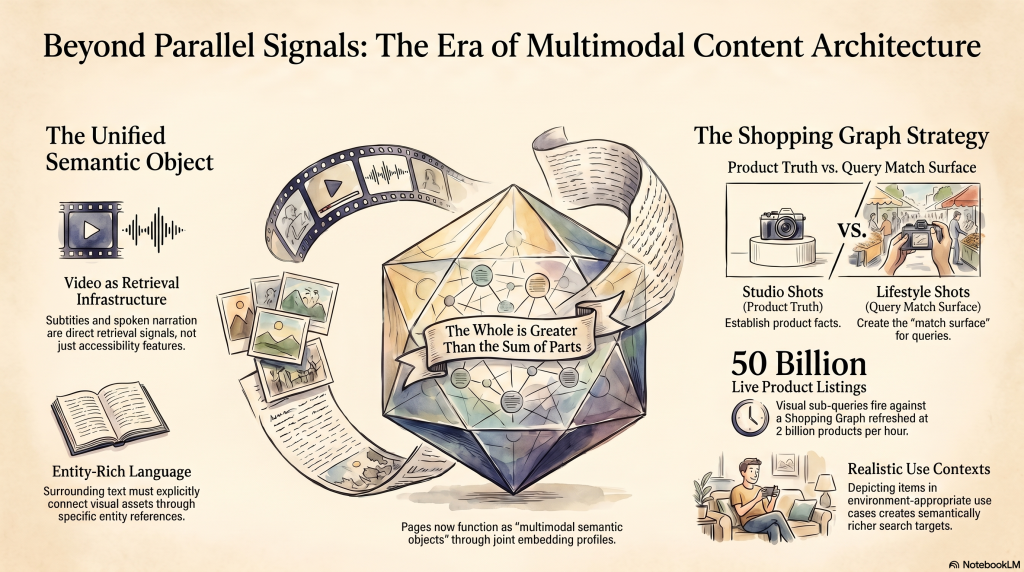
A travel destination page that includes a properly segmented and captioned video, multiple images with distinct semantic angles (arrival experience, accommodation style, activity, cuisine, mood), and surrounding text that connects those assets through entity-rich language creates a richer joint embedding profile than a page with the same images but generic copy. Google’s retrieval architecture can now treat the entire page as a multimodal semantic object, and not as a set of parallel, modality-specific signals. The whole should be greater than the sum of its parts, and with joint embeddings, it can be.
For e-commerce, visual positioning in the Shopping Graph is now a search ranking factor.
The Shopping Graph contains over 50 billion product listings refreshed at 2 billion products per hour. Visual fan-out’s sub-queries fire against this graph. Product images that depict the item in realistic use contexts — worn, carried, used in the environment it was designed for — are semantically richer targets for compound shopping queries than studio white-background shots alone. The studio shot is the product truth; the lifestyle shot is the query match surface. Both have roles; neither alone is sufficient.
The subtitle quality and ASR observability of your video content is now infrastructure.
Text in video — spoken narration, on-screen captions, clearly pronounced product names, and entity references — feeds the audio-side retrieval signal in Gemini Embedding 2’s unified space. Treating this as an accessibility nicety rather than a retrieval signal has always been a missed opportunity. In the Ask YouTube paradigm, it is a direct competitiveness factor.
The inflection point in context
It is worth being precise about what I/O 2026 actually changed, because there is a tendency in SEO coverage to treat product announcements as technical breakpoints, as if Gemini 3.5 arrived and suddenly the whole system became different. That is not quite right.
The architecture I tried to describe in this article was already in place. Gemini Embedding 2 was released in March 2026. Visual search fan-out was announced in September 2025. VideoPrism was published at ICML 2024. The contrastive learning research that underpins the unified embedding space goes back to at least 2021. What I/O 2026 did was three specific things:
- Make Gemini 3.5 Flash the default model across Search, AI Mode, YouTube, and Workspace, replacing the prior Gemini 2.0/3.0 layer. The multimodal retrieval capabilities already existed; 3.5 Flash makes them faster, more capable, and default.
- Redesign the search bar to make image and video upload native first-class query inputs. Previously, you navigated to Lens or AI Mode specifically. Now image and video query is the search bar.
- Launch Ask YouTube at scale for Premium users, formalizing the YouTube catalog as a directly queryable corpus with timestamp-precision retrieval. Previously, finding a specific moment in a specific video required knowing the video existed.
The embedding architecture is already indexing your visual content — images, videos, audio, and surrounding text — whether you have optimized for it or not. The question is not whether this is happening. The question is whether your content is positioned in the right region of the semantic space to surface when the queries fan out.
The search bar is no longer just a text box. The index is no longer just a text index. The optimization practice needs to follow.
