

NotebookLM is the best tool Google makes for reasoning over documents you already trust, and it is nothing more than that. It does not crawl, rank-track, compute, or cluster.
Treat it as the reading-and-reasoning layer of your stack, pair it with Gemini for anything quantitative, and it becomes the most useful thinking partner in the toolkit. Treat it as a one-click SEO suite, and it will quietly hand you confident nonsense.
There is, though, another important thing to notice: NotebookLM is not only a tool you point at the web, but also an agent that visits your clients’ sites and competitors’ websites, on your visitors’ behalf, and it ignores the rules you thought governed that access. That single fact reframes how a serious practitioner should think about it.
This guide is organised so you can stop reading at any point and still have something actionable. It starts with the division of labour, then the agent angle, then the workflows that earn their keep, then the precise handoff to Gemini, and finally the discipline that separates using these tools well from using them badly.
The one distinction that governs everything: reading versus computing
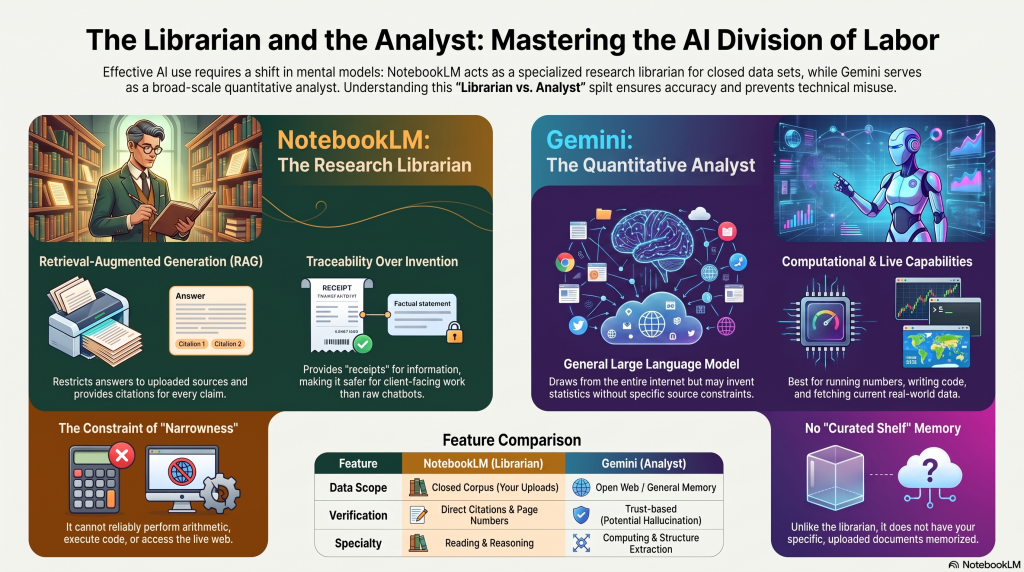
The mental model to fix before touching the tool is a division of labour between two colleagues:
- NotebookLM is the research librarian with a photographic memory of exactly the shelf you point them at. Ask what is on the shelf, and it answers with the page numbers. Ask it to forecast next quarter’s traffic, and it will politely explain that is not their job.
- Gemini is the quantitative analyst down the hall who can run the numbers, write the code, and pull live data, but who does not have your curated shelf memorised.
Technically, that librarian is doing retrieval-augmented generation, or RAG. NotebookLM restricts its answers to the sources you upload and links each sentence back to the passage it drew from.
This is the architectural reason it is safer than a raw chatbot for client-facing work. In fact, a general model generates from its memory of the whole internet and will invent a statistic without blinking, whereas NotebookLM can only tell you what is on the shelf you built, and it shows you where on the shelf it found each claim.
That traceability is the difference between “trust me” and “here is the receipt.”
The corollary is the mistake to avoid: the same architecture that makes it safe makes it narrow. It cannot do arithmetic reliably, cannot execute code, cannot expose the embeddings that power modern semantic SEO, and is not live to the web beyond what you feed it.
So, the productive framing is never “NotebookLM or Gemini.” It is “NotebookLM and Gemini”, aka the librarian reads and reasons over your closed corpus, and the analyst computes, extracts structure, and fetches what is current.
Everything useful below is an application of that split.
NotebookLM is an agent that visits your clients’ sites and ignores robots.txt
When a user pastes a URL into NotebookLM, Google fetches that page using an agent identified as Google-NotebookLM. Crucially, this agent belongs to the category Google calls user-triggered fetchers, and Google’s documentation states plainly that because the fetch was requested by a user, these fetchers generally ignore robots.txt rules.
Sit with the implication. Robots.txt has been the publisher’s control surface for two decades, but it governs crawlers that index on their own initiative, such as Googlebot, Bingbot, and the model-training bots such as GPTBot and ClaudeBot, all of which respect exclusion directives.
A user-triggered fetcher is treated as an extension of a person clicking a link in a browser, so the crawl-exclusion rules simply do not apply. If you have disallowed a path in robots.txt, that block stops Googlebot but does not stop Google-NotebookLM.
A user can direct the tool at any URL on the site regardless of what your robots file says.
Google extended the same principle in March 2026 with Google-Agent, the fetcher behind its autonomous browsing agent, which behaves identically.
For most sites, this is not a crisis but a reframing.
Two things follow directly:
- If a client has genuinely sensitive material — staging environments, paywalled content, admin paths — robots.txt was never protecting it from this class of agent, and the only reliable control is server-level. Blocking the fetcher means denying the request by user-agent at the server, for example, an Apache rewrite rule that returns a 403 when the user-agent string contains Google-NotebookLM.
- More strategically interesting, Google-NotebookLM hits in your server logs are a demand signal. They mean a real person is actively pulling your page into a research project. Add the user-agent to your log analysis, and you can watch that signal the way you already watch Googlebot, as a leading indicator of who is studying your content closely enough to build a notebook around it.
There is a second, cheaper use of the same mechanic that maps straight onto retrieval auditing.
Paste your own live URL into NotebookLM and watch what it ingests. The fetcher pulls the rendered text a user-triggered agent can see; it does not run your heavy client-side JavaScript, cannot pass paywalls or aggressive bot defences, and imports only the HTML text, aka no embedded media, no sub-pages.
If NotebookLM cannot “see” your main content because it is locked behind rendering or security, that is a strong tell that generative engines relying on similar lightweight fetching may skip it too.
This is a free, five-minute complement to a proper server-rendered-versus-rendered audit: it will not replace log analysis or a crawler that executes JavaScript, but it surfaces the most severe retrievability failures instantly.
The workflows that earn their keep
With the agent angle established, the day-to-day value of NotebookLM is grounded synthesis over corpora you assemble deliberately. The trick is to interrogate the corpus rather than ask it to write.
The loop below is the shape of the whole section: curated inputs go in, and briefs, notes, and stakeholder-ready outputs come out, all without leaving the closed corpus.
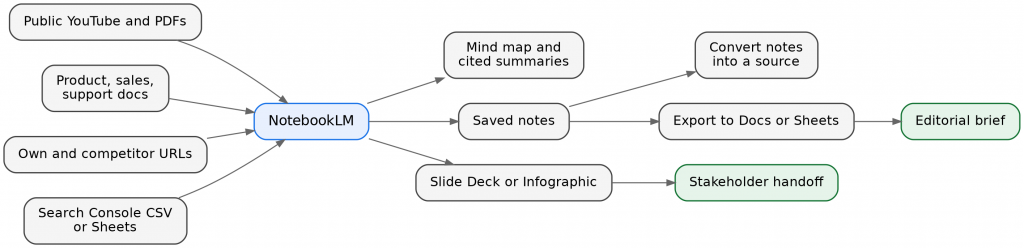
The research-to-handoff loop inside NotebookLM. Note the small feedback move; saved notes can be converted back into a source, so one round of synthesis becomes raw material for the next.
The SERP-corpus brief
For a target query, build a notebook from the top-ranking URLs, the client’s existing page, and any subject-matter PDFs.
Then ask questions grounded in that ranking set:
- Summarise the dominant intent across these sources.
- List every heading and its frequency.
- Name the subtopics present in the top five but absent from our page.
- Extract every question these pages answer, phrased as a user would ask it (your raw material for FAQ blocks and People Also Ask coverage).
- Build a table of each competitor’s claimed differentiators.
Because every answer is tethered to the pages Google is currently rewarding, the resulting brief reflects the live competitive reality rather than the model’s guess about it.
What NotebookLM has replaced here is the reading labour of competitive research, not the judgement, and not the writing.
Auto-labels as a contradiction engine, used correctly
Since April 2026, once a notebook holds five or more sources, NotebookLM will automatically read and group them into thematic labels.
It is worth being precise about what this is, because it is easy to oversell: it is large-language-model categorisation of your sources by topic, not embedding-based clustering, and a single source can carry several labels.
What makes it useful for SEO is less the tidiness and more the toggling. You can switch a label group on or off to focus the chat on just that subset of sources.
For instance, load your own pages under one label and the competitor set under another, then ask the model to analyse the contradictions, friction points, and coverage the competitor cluster contains that your cluster does not.
That is competitor-versus-own gap analysis, grounded and cited, driven by a feature that ships free on every tier. Just do not mistake the labels for a semantic clustering pipeline; for true clustering, you leave the tool entirely, which is the next section.
Three editorial checks for machine readability
Before a page goes live, three quick tests catch the failures that hurt you in AI answers, and they need no tooling:
- The Isolation Test: pull one sentence at random and ask whether it holds its meaning with no surrounding context. If it leans on vague pronouns or unstated references, the paragraph-fragmenters that feed generative engines cannot use it, and it should be rewritten to stand alone.
- The Double-Scroll Test: scroll the draft twice, stop, and read whatever is on screen; do the headings and structure communicate the topic and answer a clear intent immediately?
- The Entity Disambiguation Test: check that every brand, product, person, and concept is defined unambiguously on first mention, so a semantic system does not confuse your entity with a similarly named one. None of these is theoretical; each is a red-pen pass you can run in ten minutes.
Repurposing and learning
A single grounded source can become a briefing report, a slide deck for a pitch, a data table for an appendix, and an audio overview for a commute; all consistent because they draw on the same shelf.
And the sleeper use case for senior practitioners: upload a dense Google patent, the Search Quality Rater Guidelines, or a leak analysis, generate an audio overview, and absorb the argument on a walk, with the source still in the notebook for citation-checking when a claim matters.
Just remember that generated artifacts are communication media, not evidence. Google, in fact, warns they can contain inaccuracies, so anything you will repeat publicly gets verified against the underlying source first.
Where NotebookLM stops, and Gemini begins
The most common way to misuse NotebookLM is to ask it to compute, because it reads but does not calculate.
The moment the work shifts from “understand these sources” to “process this data,” you cross into Gemini’s half of the division of labour, and the API surfaces are worth naming because they are the concrete answer to “what can Gemini do that NotebookLM cannot.”
For data, the relay runs in one direction: crunch first, synthesise second.
Gemini’s Code Execution runs Python in a sandbox over a CSV. For instance:
- Parse a crawl export
- Segment by page type
- Compute click-through decay by position
- Chart the trend.
Structured Outputs returns type-safe JSON against a schema you define, so the model hands back rows ready for a sheet or a backlog rather than prose you have to re-parse.
Grounding with Google Search and URL Context bring in current web information with verifiable sources (URL Context works on public pages and PDFs, capped at around twenty URLs per request).
Function Calling wires those findings to your own systems, and File Search provides managed RAG when you want to index internal documentation. You do the computation in Gemini, export the findings — the summary tables, the anomaly list, the charts — and only then upload that clean document into NotebookLM alongside the client’s brand guidelines and prior audits and ask it to write the grounded narrative: what these findings mean for our refresh priorities, citing our own prior work.
In other words, Gemini produced the numbers, and NotebookLM turns them into a defensible, cited story. Neither tool does both jobs well.
The pipeline below shows where the boundary falls. NotebookLM enters only at the synthesis step, with everything upstream and the write-back to your own systems handled by Gemini.
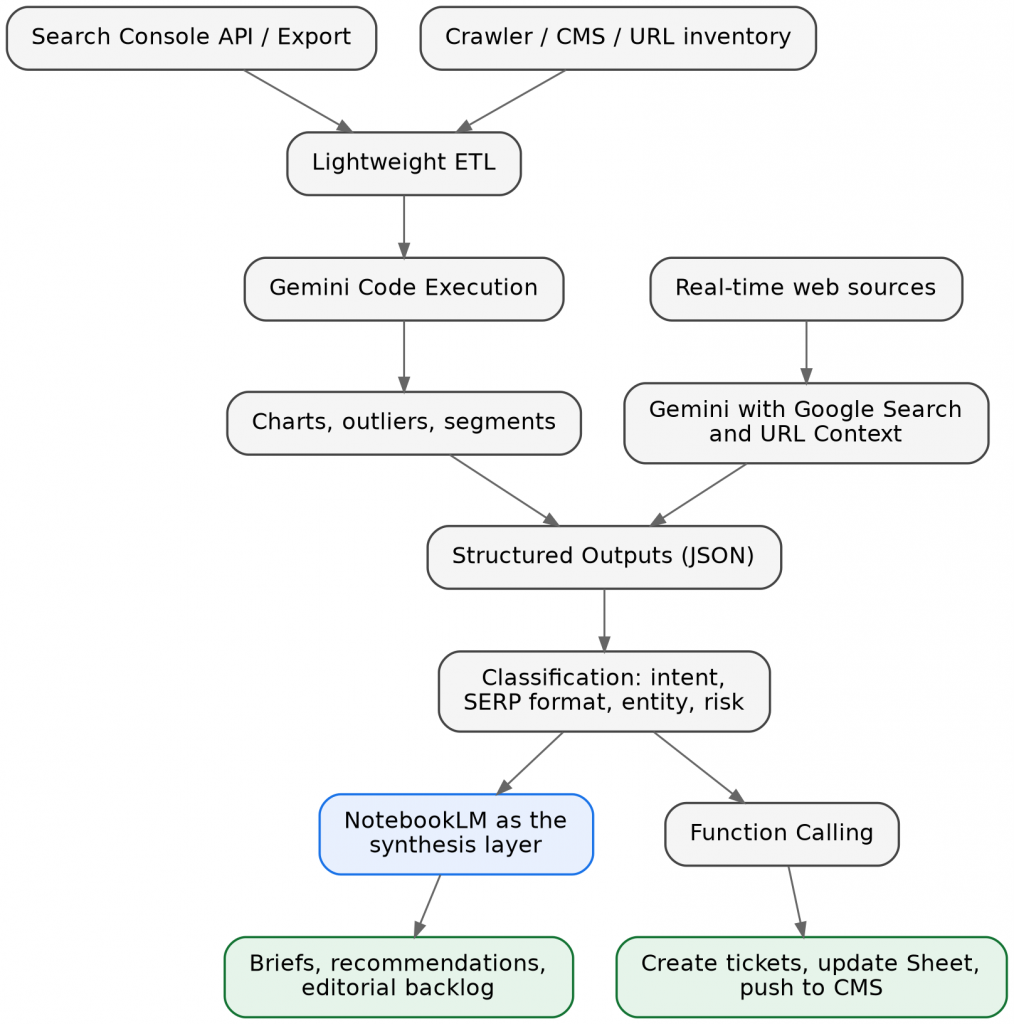
The data-to-activation pipeline. The two input branches — your own data through lightweight ETL, and the live web through Gemini’s search tools — converge on structured JSON, then fork into NotebookLM for the narrative and Function Calling for the write-back to tickets, Sheets, and the CMS.
Entities follow the same pattern.
NotebookLM is genuinely good at the qualitative question — which entities the top-ranking pages consistently mention that we do not — but it cannot give you Google-canonical entity data.
For that, you leave the tool and move to the Cloud Natural Language API, which returns, for any text, each entity’s type and a salience score between zero and one indicating how central it is, plus the Knowledge Graph machine ID where one exists.
One limit must be recognized: that API returns individual matching entities, not a graph of interconnected ones, and Google itself recommends Wikidata dumps if you need real relationship graphs.
The mature workflow chains these:
- Extract and score with the NLP API.
- Validate the important entities against the Knowledge Graph.
- Dump the resulting tables into NotebookLM and let it write the synthesis: ‘here are the salient entities we uncovered, here is which ones Google recognises, here is the plan to close the gap’.
The APIs are the instruments; NotebookLM is the interpreter.
Embeddings and clustering are where hype does the most damage, so be blunt: NotebookLM does not expose embeddings or clustering to the user at all. There is no button that vectorises your keywords and no cosine-similarity view.
If a step requires true semantic clustering, this is not the tool for that step.
The intuition, in plain terms, is worth carrying because it underpins internal linking and cannibalisation work: an embedding turns a query or a page into a long list of numbers — a coordinate — such that things with similar meaning sit close together even when they share no words, so “men’s running shoes” lands next to “sneakers for jogging” while “running a business” drifts away.
Clustering just draws circles around the dense neighbourhoods, and those neighbourhoods are your topic clusters.
To do it for real, you:
- Generate embeddings with the Gemini embeddings API — gemini-embedding-001 for text, or the multimodal gemini-embedding-2 that reached general availability in April 2026.
- Cluster in Python or BigQuery
- Export the cluster table into NotebookLM to name pillars, spot demanded clusters with no existing page, and draft an internal-linking map.
The mathematics happens outside; the strategy synthesis happens inside. That handoff, not a mythical one-click clustering feature, is the professional workflow.
Discipline over incantation: how to prompt without deskilling
A note on the ready-made prompt templates for NotebookLM (and other AI surfaces) that circulate on LinkedIn and X, because there is a real distinction hiding inside them.
One kind is the magic one-shot: a prompt that promises a ranking outcome, encodes no thinking, and invites you to paste and walk away. Distrust those on sight; they are the SEO-spam pattern wearing an AI costume.
But a second kind is a guardrail scaffold; a structure that enforces good discipline so:
- Work only from the selected sources.
- Cite every material claim.
- Explicitly flag anything the sources do not support.
- Return the answer in a fixed shape.
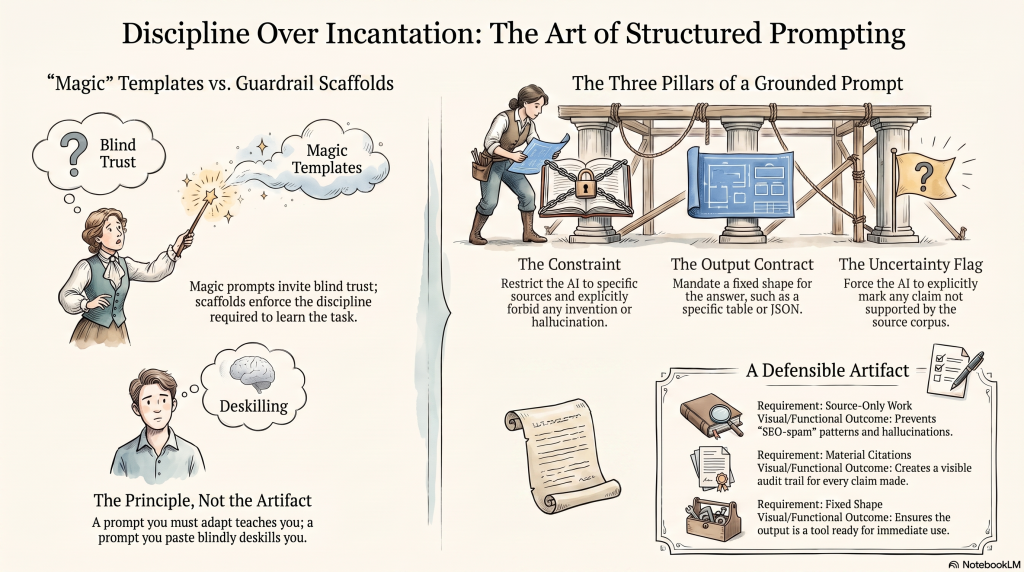
That discipline is worth keeping. The problem is never that it is a prompt; the problem is presenting it as a finished incantation to be copied rather than a structure to be adapted, because a prompt you must adapt teaches you the task while a prompt you paste blindly deskills you out of it.
So, the principle, not the artifact: every good, grounded prompt has three parts:
- A constraint (only these sources, no invention).
- An output contract (the exact table or JSON shape you want back).
- An uncertainty flag (mark as unsupported anything not verifiable in the corpus).
A worked example for a reoptimization brief looks like this in structure, not as gospel to be pasted:
Act as an SEO strategist working only from the sources in this notebook, including the Search Console export; identify queries with high impressions and low click-through, and queries sitting between position four and twenty; for each, return a row with the finding, the supporting evidence in the sources, the proposed change, the expected impact, and the risk; and mark any claim you cannot ground as unsupported.
That gives you a defensible artifact with a visible audit trail, and it is something you shape to each engagement rather than a spell you recite.
Governance and the limits we must know
Two governance facts decide whether client work is safe:
- Privacy differs sharply by account type: on consumer accounts, if you submit feedback, Google may collect the prompt, sources, and output for human review, whereas Workspace and Education accounts carry the guarantee that uploaded files, chats, and outputs are not human-reviewed and not used to train generative models. Never process a client’s confidential material on a personal account and match the tier to the sensitivity of the data.
- There is no public consumer API; the only supported programmatic surface is the NotebookLM Enterprise API on Google Cloud, and unofficial reverse-engineered libraries violate Google’s terms and risk your account, so real automation lives in the Enterprise product or in the underlying Gemini and Vertex APIs.
The remaining limits are the ones to state rather than discover:
- NotebookLM is not live, and it knows only what you upload plus what you pull through its Discover feature, and the latter imports unvetted web content you should treat as candidates rather than gospel.
- Grounding reduces hallucination but does not eliminate it; the model can still misread a source, so click through the citations on anything you publish.
And because features, source caps, tier prices, and even the underlying Gemini version change month to month, treat the current numbers as perishable and confirm them in the NotebookLM Help Center at the time you need them rather than trusting any figure quoted in an article — including this one.
Keep NotebookLM in its lane — grounded reading and reasoning — pair it with the right instrument for every other job and brief your clients that it is also an agent already knocking on their servers. Do that, and it stops being another tool in a crowded category and becomes the reasoning layer the rest of the stack organises around.
